
Building a gaming PC that balances performance aspirations with budget realities requires strategic planning and informed component selection. Every dollar spent should contribute meaningfully to your gaming experience rather than funding unnecessary features or poorly allocated resources. This comprehensive budget guide analyzes how to distribute funds across component categories, identifies the best value hardware at multiple price points and teaches you to recognize diminishing returns that separate smart investments from wasteful spending. Whether considering custom gaming PC configurations or pre-built options, understanding cost optimization remains essential for maximizing value.
I’ve helped dozens of friends and family members build gaming PCs over the years. The most common mistake I see is misallocating budget toward flashy components that don’t improve gaming performance. Learning where to spend and where to save transforms a mediocre build into an exceptional one at the same total cost.
Understanding Budget Allocation Fundamentals
The GPU should consume the largest portion of your gaming PC budget. This single component determines frame rates more than anything else. Allocating 35-45% of total budget to the graphics card makes sense for gaming-focused builds. A $1200 system benefits more from a $500 GPU and $200 CPU than the reverse combination.
CPU allocation typically ranges from 15-20% of total budget. Gaming doesn’t require the most expensive processors. A solid mid-range CPU paired with a strong GPU outperforms an expensive CPU with a weak GPU every time. The CPU prevents bottlenecks but adding $200 to CPU budget while cutting $200 from GPU budget hurts gaming performance.
Remaining budget distributes across motherboard, RAM, storage, power supply, case and cooling. These supporting components enable your system to function properly without directly impacting frame rates. Going too cheap on these parts causes problems but spending excessively provides minimal benefit. A $100 motherboard works as well as a $300 board for most gaming scenarios.
Ideal Budget Distribution for Gaming PC
| Component | Percentage Range |
| GPU | 35–45% |
| CPU | 15–20% |
| Motherboard | 8–10% |
| RAM | 5–8% |
| Storage | 5–8% |
| PSU | 6–9% |
| Case/Cooling | 8–12% |
Percentage allocation optimized for maximum gaming performance
Budget Tier Breakdowns and Recommendations
Entry Level: $700-900
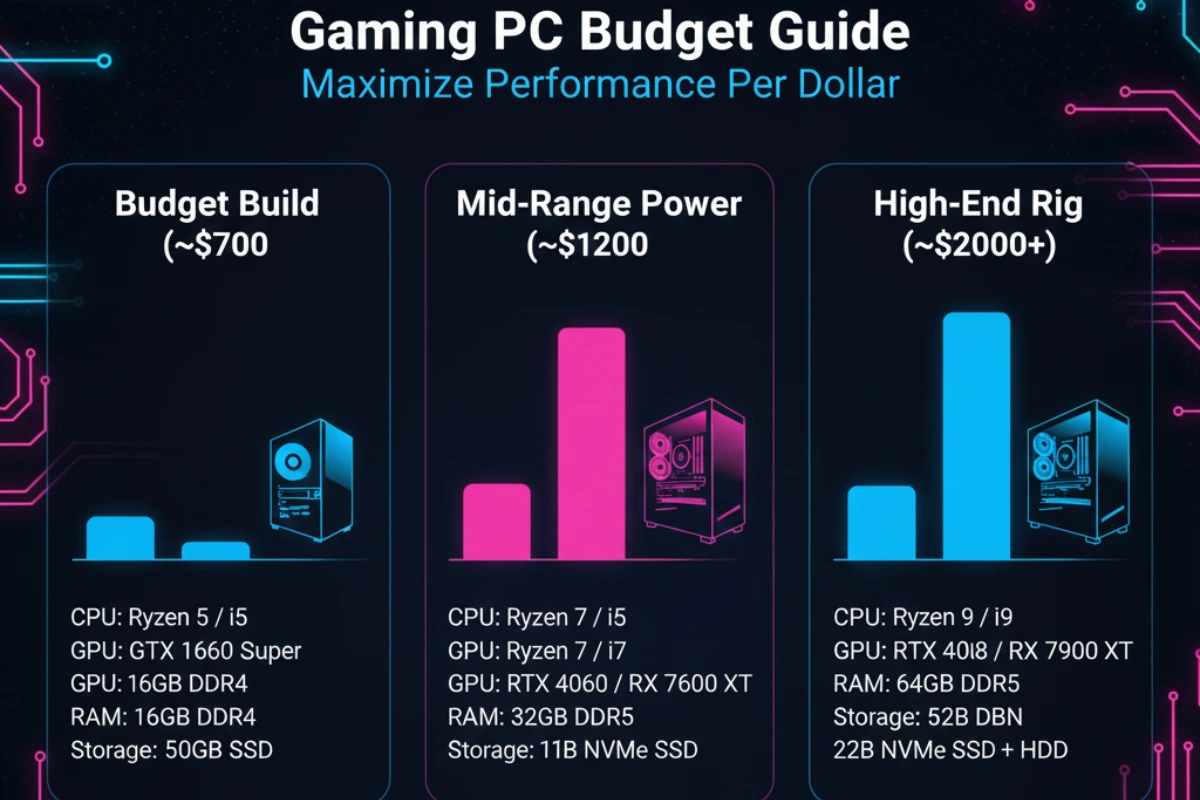
This tier targets 1080p gaming at 60-100fps with medium to high settings. Focus on current-generation budget components that deliver solid performance without premium pricing. The RTX 4060 or RX 7600 makes sense for GPU selection paired with a Ryzen 5 5600 or Intel i5-12400F processor.
Sample allocation: GPU $280, CPU $160, Motherboard $90, RAM (16GB) $50, Storage (500GB NVMe) $40, PSU (550W) $65, Case $45, Cooling (stock)
This budget requires careful shopping and patience for sales. Avoid RGB lighting and premium aesthetics. Every dollar spent on appearance is a dollar not improving performance. Stock coolers work fine at this price point.
Mid-Range: $1200-1600
The sweet spot for most serious gamers targeting 1440p gaming at 100-144fps with high to ultra settings. This budget allows quality components across the board without major compromises. An RTX 4070 or RX 7800 XT paired with a Ryzen 7 5800X3D or i5-13600K delivers excellent performance.
Sample allocation: GPU $550, CPU $280, Motherboard $150, RAM (32GB) $80, Storage (1TB NVMe + 1TB HDD) $110, PSU (750W Gold) $110, Case $85, Cooling $60
This tier provides room for quality-of-life features like modular power supplies, better airflow cases and aftermarket CPU coolers. You can include some RGB without sacrificing performance. The system handles current games excellently and future-proofs reasonably well.
High-End: $2000-3000
Premium builds targeting 4K gaming or 1440p at maximum refresh rates with all settings maxed. Component selection focuses on top-tier hardware with RTX 4080 or 4090 GPUs paired with high-end processors like Ryzen 9 7900X or i7-14700K.
Sample allocation: GPU $1100-1600, CPU $400-550, Motherboard $250, RAM (32GB DDR5) $150, Storage (2TB NVMe Gen4) $180, PSU (850W Platinum) $150, Case $130, Cooling (AIO) $120
Diminishing returns become noticeable at this budget level. The jump from $1500 to $2500 doesn’t double performance. However, this tier provides the best possible gaming experience with ray tracing enabled and no compromises on settings or resolution.
Component-Specific Value Strategies
Graphics cards represent the most important purchasing decision. Buying previous generation hardware when new cards launch provides excellent value. An RTX 3070 Ti at $400 during RTX 4000 series launch offered better value than a new RTX 4060 Ti at $450. Performance differences were minimal but pricing reflected the new product premium.
Used GPU market offers savings but carries risks. Graphics cards worked hard mining cryptocurrency may fail prematurely. Buy used cards only from reputable sellers with return policies. Test thoroughly immediately upon receipt. The savings can reach 30-40% but warranty protection disappears.
Processors provide excellent longevity making last-generation CPUs smart purchases. A Ryzen 5 5600 performs nearly identically to newer budget options while costing less. Intel’s 12th generation remains competitive with 13th gen for gaming despite lower pricing. CPU performance improvements between generations rarely justify premium pricing for gaming workloads.
RAM pricing fluctuates significantly. Buy during market lows rather than peaks. The difference between $45 and $75 for 16GB adds up across builds. Speed matters less than capacity for gaming. DDR4-3200 provides 95% of DDR4-3600 performance at lower cost. DDR5 costs more while delivering minimal gaming benefits currently.
| Component | Safe to Buy Used | Best Time to Buy | Where to Save | Never Skimp On |
|---|---|---|---|---|
| GPU | Risky | New gen launch | Previous gen models | VRAM capacity |
| CPU | Yes | New gen launch | Last gen high-end | Core count for workload |
| Motherboard | Risky | Clearance sales | Premium features | VRM quality |
| RAM | Yes | Market low cycles | Speed beyond 3200MHz | Capacity (16GB min) |
| Storage | No | Black Friday | Gen4 vs Gen3 NVMe | Brand reliability |
| PSU | No | Major sales | Efficiency ratings | Quality and wattage |
Avoiding Common Budget Mistakes
Overspending on motherboards wastes money for most builders. A $250 motherboard doesn’t game better than a $120 board with the same chipset. Expensive boards add USB ports, premium audio and advanced overclocking features most users never utilize. Save that $130 difference for a better GPU.
RGB lighting looks nice but costs real money. Every RGB fan, strip and component adds $10-30 to total build cost. A system with $150 in RGB components could upgrade from an RTX 4060 to 4060 Ti instead. Prioritize performance over aesthetics especially on tighter budgets.
Storage capacity needs vary widely. A 500GB SSD works fine if you play 2-3 games concurrently and manage your library. Adding a $80 2TB drive makes sense only if you actually need that capacity. Many builders overestimate storage requirements then pay for unused space.
Budget Killer: Buying components piecemeal over months means early purchases may become outdated or incompatible with later choices. Save money then buy everything together during a good sale period.
Timing Your Purchase for Maximum Value
Hardware pricing follows predictable patterns throughout the year. Black Friday and Cyber Monday offer the deepest discounts on most components. Retailers clear inventory aggressively during this period. I’ve seen CPUs drop $50-80 and GPUs discount $100-200 during major sales.
New product launches create opportunities on previous generation hardware. When RTX 5000 series launches, RTX 4000 pricing will drop. AMD and Intel CPU launches similarly affect pricing. Patient buyers who purchase previous generation hardware during new launches maximize value.
Back-to-school sales in August provide another strong buying opportunity. Student-focused marketing drives competitive pricing on complete systems and components. Spring typically sees the worst pricing as demand remains strong post-holidays while summer sales haven’t started.
Money-Saving Tip: Use price tracking tools like PCPartPicker and set alerts for target components. Buy pieces as they hit your target price rather than everything at once. The savings add up significantly over a complete build.
Balancing Present Performance and Future Upgrades
Building with future upgrades in mind provides better long-term value. A quality 750W power supply costs $30 more than a 550W unit but supports future GPU upgrades without replacement. Similarly, a motherboard with extra M.2 slots costs $20 more but allows adding storage later without hassle.
However, excessive future-proofing wastes money. Buying 64GB RAM for gaming provides zero benefit today and may still provide zero benefit in five years when you upgrade anyway. Purchase what you need now with reasonable headroom for likely near-term upgrades.
Case quality matters for longevity. A well-built $80-100 case survives multiple component upgrades over 8-10 years. Cheap $40 cases work initially but poor build quality, limited airflow and dated designs encourage replacement sooner. The $40 extra spent on a quality case spreads across many years of use.
Understanding budget optimization transforms your gaming PC investment. Smart allocation focuses money where it matters most while avoiding wasteful spending on marginally beneficial upgrades. After maximizing your initial build value, proper maintenance and strategic upgrade timing extend system lifespan even further. Discover gaming PC maintenance routines and upgrade planning strategies to protect your investment and keep performance optimal for years to come.