
Essential Gaming PC Components: Complete Selection Guide
Selecting the right components for your gaming rig can feel overwhelming with hundreds of options across every hardware category. Understanding how each piece contributes to overall performance helps you make informed decisions that maximize gaming experiences within your budget. Whether you’re planning a complete custom gaming PC build or exploring individual upgrades, this comprehensive breakdown covers everything from processors and graphics cards to memory and cooling solutions.
After building gaming PCs for over two decades, I’ve learned that smart component selection matters more than simply buying the most expensive parts. The goal is finding that sweet spot where every dollar spent translates into noticeable performance gains. Some components deliver massive improvements while others offer diminishing returns beyond a certain price point.
The Graphics Card: Your Gaming Performance Foundation
The GPU determines your frame rates more than any other component. This single piece of hardware makes the difference between smooth 144fps gameplay and stuttering 30fps disappointment. Current generation cards from Nvidia and AMD offer excellent options across all price ranges.
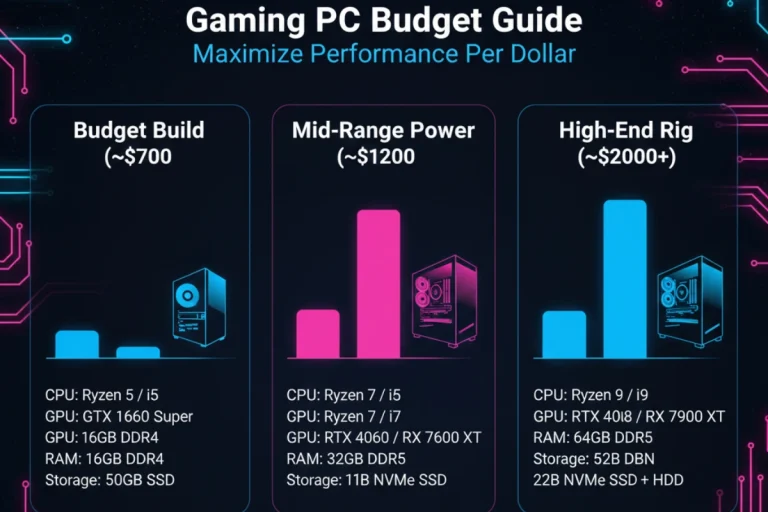
For 1080p gaming at high settings, cards like the RTX 4060 or RX 7600 deliver solid 60-100fps in most modern titles. These mid-range options typically cost between $250-350 and represent the best value for most gamers. Step up to 1440p gaming and you’ll want something like an RTX 4070 or RX 7800 XT. These cards handle demanding games at higher resolutions without breaking a sweat.
The high-end segment gets expensive quickly. Cards like the RTX 4080 and 4090 target 4K gaming with all settings maxed out. They cost $1000-1600 but deliver performance that justifies the price if you’re serious about 4K or high refresh rate 1440p gaming. AMD’s 7900 XTX competes here too with strong rasterization performance at a lower price point than Nvidia’s top offerings.
VRAM capacity matters for longevity. Games increasingly use more video memory at higher settings. An 8GB card works fine today but 12GB or 16GB provides better future-proofing. Check independent benchmarks for the specific games you play before committing to a GPU purchase.
Processors: Balancing Gaming and Multitasking
CPU selection depends on your gaming preferences and other PC usage. Modern games benefit from strong single-core performance rather than massive core counts. A 6-core processor handles most gaming scenarios perfectly well. Going beyond 8 cores only helps if you stream, edit video or run heavy multitasking workloads alongside gaming.
Intel’s current generation offers excellent gaming performance. The i5-13600K provides outstanding value with hybrid architecture combining performance and efficiency cores. For pure gaming the i5-12400F costs less and still delivers great results. AMD’s Ryzen 7 5800X3D remains a gaming powerhouse thanks to its large 3D V-Cache. The newer Ryzen 7000 series competes strongly but requires more expensive DDR5 memory and motherboards.
Avoid bottlenecking your GPU by pairing components appropriately. A budget CPU with a high-end GPU wastes money and limits frame rates. Match your processor tier to your graphics card tier. Budget GPU gets budget CPU, high-end GPU deserves high-end CPU.
Memory and Storage: Speed and Capacity Essentials
RAM capacity matters more than speed for gaming. 16GB represents the current sweet spot for gaming-only systems. Some newer titles benefit from 32GB but most run perfectly fine with 16GB. Speed differences between 3200MHz and 3600MHz RAM show minimal real-world gaming impact in most scenarios.
DDR4 remains the practical choice for most builds. DDR5 offers higher bandwidth but costs significantly more and provides marginal gaming benefits currently. Unless building a high-end system or planning long-term upgrades on the same platform, DDR4 makes more financial sense.
Storage technology transformed gaming experiences over the past few years. NVMe SSDs reduce loading times dramatically compared to old hard drives. A 500GB NVMe drive for your operating system and main games costs under $50 now. Gen4 drives offer faster speeds than Gen3 but the real-world difference in game loading remains small. Save money with a quality Gen3 drive unless you find Gen4 pricing competitive.
Consider a dual-drive setup for optimal value. Use a fast 500GB-1TB NVMe SSD for frequently played games and Windows installation. Add a larger 2TB SATA SSD or even a 4TB hard drive for game library storage. This combination provides speed where it matters and capacity where you need it.
Component Priority Hierarchy for Gaming
GPU → CPU → RAM → Storage
Allocate your budget following this priority order for maximum gaming performance
Power Supply and Motherboard: The Supporting Foundation
Power supplies deserve more attention than most builders give them. A quality PSU protects your entire system investment. Cheap units fail and potentially damage other components. Stick with reputable brands like Corsair, EVGA, Seasonic or Be Quiet. Look for 80 Plus Bronze certification at minimum with Gold being the sweet spot for efficiency and value.
Wattage calculation involves adding your CPU and GPU power draw then adding 20-30% overhead. Most gaming systems run fine on 650-750W power supplies. High-end builds with power-hungry GPUs might need 850W or more. Modular cables make building easier and improve airflow by eliminating unused cable clutter.
Motherboard selection focuses on matching your CPU socket and providing needed features. You don’t need the most expensive board unless you want specific features like extensive RGB control, premium audio codecs or advanced overclocking. Mid-range boards deliver everything most gamers need including solid VRM quality, adequate USB ports and M.2 slots for NVMe drives.
Check motherboard compatibility with your chosen RAM speed and ensure it has enough fan headers for your cooling setup. WiFi and Bluetooth come integrated on many boards now which adds convenience if you can’t run ethernet cable to your gaming space.
| Component | Budget Choice | Performance Impact | Upgrade Priority |
|---|---|---|---|
| Graphics Card | $250-350 | Very High | High |
| Processor | $150-250 | High | Medium |
| Memory (RAM) | $50-80 (16GB) | Medium | Low |
| Storage (SSD) | $40-70 (500GB NVMe) | Medium (loading times) | Low |
| Power Supply | $70-100 (650W) | Low (stability) | Very Low |
| Motherboard | $100-150 | Low (features) | Very Low |
Cooling and Case: Thermal Management and Aesthetics
Adequate cooling prevents thermal throttling that reduces performance. Stock CPU coolers work for non-overclocked processors but aftermarket coolers run quieter and maintain lower temperatures. Tower air coolers from companies like Noctua or Arctic cost $30-60 and provide excellent cooling. All-in-one liquid coolers look cleaner and cool slightly better but cost more and add potential failure points.
Case airflow matters as much as the CPU cooler. Front intake fans pull cool air in while rear and top exhaust fans remove hot air. This positive pressure setup keeps components cool and reduces dust accumulation. Most cases include 1-2 fans but adding more improves thermal performance noticeably.
Case selection balances aesthetics with functionality. Tempered glass side panels showcase your build while mesh front panels maximize airflow. Ensure your chosen case fits your GPU length and CPU cooler height. Tool-free installation features and cable management cutouts make building easier and cleaner.
Optimal Airflow Configuration
Front: 2-3 Intake Fans (cool air in)
Rear: 1 Exhaust Fan (hot air out)
Top: 1-2 Exhaust Fans (optional, hot air rises)
Bottom: Intake Fan under GPU (optional, direct cooling)
This configuration creates positive pressure and optimal thermal performance
Making Smart Component Choices
Research before buying saves money and disappointment. Read professional reviews and check user benchmarks for games you actually play. Marketing claims often exaggerate performance differences. A $200 price increase rarely translates to proportional performance gains.
Consider buying previous generation hardware when new products launch. Last year’s high-end GPU often drops to mid-range pricing while still delivering excellent performance. The same applies to processors where older models frequently discount heavily despite minimal real-world performance differences for gaming.
Component compatibility matters more than individual part quality. An unbalanced system with mismatched components underperforms. Research your specific combination and verify that your motherboard supports your RAM speed, your power supply provides adequate wattage and your case fits all components comfortably.
Once you understand gaming PC components and how they work together, the next step involves deciding whether to source and assemble everything yourself or purchase a pre-configured system. Both approaches offer distinct advantages worth exploring in depth. Learn more about pre-built gaming PC options and what major brands offer to make an informed decision that matches your technical comfort level and budget.