

The decision between building a custom gaming PC or purchasing a pre-built system represents one of the most significant choices facing new and experienced gamers alike. Both approaches offer distinct advantages and trade-offs that extend beyond simple cost comparisons to encompass factors like technical comfort levels, time availability, warranty preferences and upgrade flexibility. This detailed comparison examines every angle of the debate from assembly complexity to long-term value, providing the insights needed to confidently choose the approach that aligns with your specific circumstances. Understanding the complete landscape of custom gaming PC options and pre-built alternatives empowers you to make the right decision for your gaming ambitions.
Having built over fifty custom PCs and tested numerous pre-built systems throughout my gaming career, I’ve seen both approaches succeed and fail. The right choice depends entirely on your individual situation rather than one option being universally superior.
Cost Comparison and Value Analysis
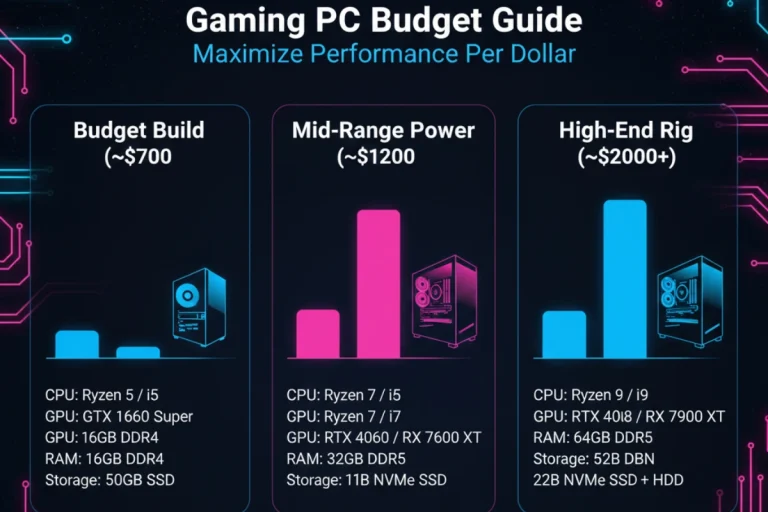
Custom building typically saves 10-20% compared to equivalent pre-built systems during normal market conditions. This price difference reflects assembly labor, warranty administration costs and manufacturer profit margins. A $1200 custom build often matches a $1400 pre-built in specifications. However, this gap narrows or reverses during component shortages when manufacturers secure better GPU allocations than individual buyers.
Pre-built pricing becomes competitive during major sales events. Black Friday and Cyber Monday deals sometimes price complete systems below custom build equivalents. Manufacturers aggressively clear inventory before new product launches creating genuine value opportunities. I’ve witnessed RTX 4070 pre-builts drop to prices matching the GPU alone plus basic components.
Hidden costs affect total ownership calculations. Custom builds require purchasing Windows licenses separately adding $100-140 to total cost. Pre-builts include licensed operating systems and sometimes bundle peripherals or software subscriptions. Factor these additions when comparing final prices. A keyboard and mouse bundle worth $80 adds real value if you need those items.
Long-term value considerations favor custom builds through better upgrade flexibility. Pre-built systems occasionally use proprietary components limiting future upgrades. Standard custom components allow swapping any part without compatibility concerns. This flexibility extends system relevance by several years potentially saving hundreds in replacement costs.
| Cost Factor | Custom Build | Pre-Built System | Winner |
|---|---|---|---|
| Initial Hardware Cost | $1000 (baseline) | $1150 (+15%) | Custom |
| Windows License | +$120 | Included | Pre-Built |
| Assembly Time Value | 3-4 hours | None | Pre-Built |
| Warranty Coverage | Individual parts | Complete system | Pre-Built |
| Upgrade Flexibility | Unlimited | Sometimes limited | Custom |
| 5-Year Total Cost | Lower (easier upgrades) | Higher (limited options) | Custom |
Technical Skill Requirements and Learning Curve
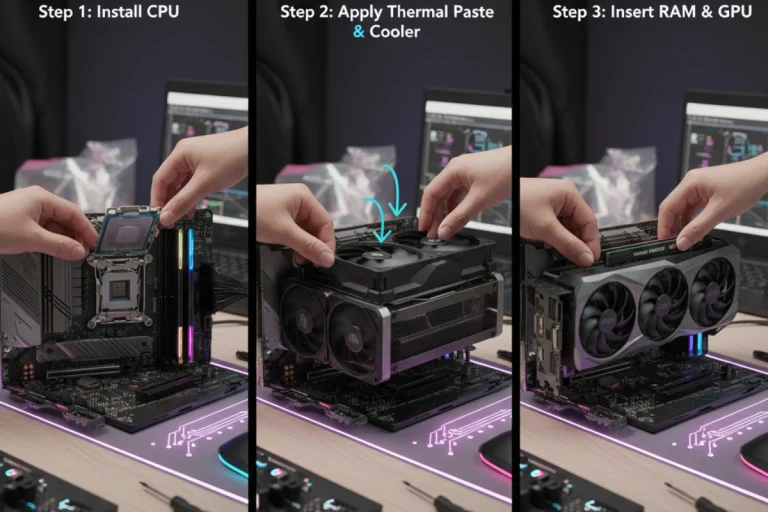
Building a custom PC demands moderate technical knowledge and comfort handling computer hardware. The physical assembly process remains accessible to beginners willing to follow instructions carefully. Modern components feature standardized connections reducing complexity significantly compared to builds from ten years ago.
Research time represents the largest investment for custom builders. Selecting compatible components requires understanding CPU sockets, RAM generations, power requirements and physical clearances. This learning phase consumes 5-10 hours for first-time builders researching specifications and reading reviews. Experienced builders complete research in under an hour having internalized compatibility rules.
Troubleshooting skills matter when issues arise. Custom builders must diagnose which component causes problems before initiating warranty claims. This requires systematic testing isolating failures to specific parts. Pre-built buyers contact one support number regardless of which component failed. The manufacturer handles diagnosis and repair coordination.
Pre-built systems eliminate the learning curve entirely. You research complete systems rather than individual components. Comparison shopping focuses on overall specifications and brand reputation. This approach suits buyers wanting gaming capability without becoming hardware enthusiasts. The convenience trades off against the valuable knowledge gained through custom building.
Custom Build Advantages
- Complete component selection control
- Better value for money (10-20% savings)
- Unlimited upgrade flexibility
- Learning experience and technical knowledge
- No proprietary parts or bloatware
- Personal satisfaction and customization
Custom Build Disadvantages
- Requires 3-4 hours assembly time
- Individual component warranties to manage
- Self-diagnosis of technical issues
- Risk of user error during building
- Extensive research time needed
- No immediate tech support
Warranty and Support Considerations
Comprehensive warranty coverage stands as the primary pre-built advantage. Manufacturers provide 1-3 year system warranties covering everything through a single support channel. This umbrella protection means one phone call regardless of which component fails. Premium brands like Alienware and Asus ROG offer expedited support with advanced replacement options.
Custom builders manage individual component warranties from different manufacturers. Graphics cards typically include 2-3 year warranties while power supplies often feature 5-10 year coverage. When issues arise you must identify the failing component then contact that specific manufacturer. This fragmented approach requires more effort but provides longer coverage for quality components.
Support quality varies dramatically between pre-built brands. Budget manufacturers often provide email-only support with slow response times. Premium brands offer phone support, live chat and sometimes on-site service. Research brand reputation for warranty service before purchasing. A great warranty means nothing if the company takes weeks responding to claims.
Extended warranty options add cost but provide peace of mind. Evaluate whether extra coverage justifies the expense based on system cost and your technical comfort. A $2500 pre-built warrants extended warranty consideration more than an $800 budget system. Custom builders rely on component warranties making extended coverage less relevant.
Pre-Built Advantages
- Ready to use immediately (plug and play)
- Comprehensive system warranty
- Professional assembly quality
- Single support contact point
- Sometimes competitive pricing during sales
- No assembly mistakes possible
Pre-Built Disadvantages
- Limited component selection
- Typically 10-20% price premium
- May include proprietary parts
- Often includes bloatware
- Less upgrade flexibility
- Generic component choices
Time Investment and Convenience Factors
Pre-built systems arrive ready for immediate gaming. Unbox the system, connect peripherals, power on and start playing. This convenience appeals to buyers valuing their time highly or those excited to game immediately. The entire setup process takes under thirty minutes including driver updates.
Custom building requires significant time investment spread across multiple phases. Research and component selection consume 5-10 hours for first builds. Ordering from multiple retailers and waiting for deliveries adds another week. Physical assembly takes 3-4 hours for beginners or 1-2 hours for experienced builders. First boot troubleshooting occasionally adds several hours if issues arise.
Calculate time value honestly when comparing options. If your free time is extremely limited, paying the pre-built premium makes economic sense. Spending six hours building a PC to save $200 values your time at $33 per hour. However, many people enjoy the building process finding it rewarding rather than tedious. The satisfaction of powering on a system you assembled yourself provides intangible value.
Decision Framework
Choose Custom Building If:
• Budget conscious
• Enjoy learning hardware
• Want upgrade flexibility
• Have time to research
• Comfortable with basic tech
Choose Pre-Built If:
• Value convenience highly
• Want immediate gaming
• Prefer comprehensive warranty
• Limited technical knowledge
• Time is very limited
Performance and Quality Differences
Performance differences between custom and pre-built systems with identical specifications remain minimal. A system with an RTX 4070 and Ryzen 7 5800X delivers similar gaming performance regardless of assembly method. However, component quality varies significantly affecting long-term reliability and upgrade potential.
Pre-built manufacturers sometimes cut costs on less visible components. Generic power supplies, slow RAM configurations and basic motherboards appear in budget pre-builts. These compromises don’t immediately impact gaming but limit upgrade paths and potentially reduce reliability. Premium pre-built brands use quality components throughout while budget brands make more sacrifices.
Custom builders control every component choice ensuring quality matches priorities. Allocate budget toward components affecting performance while saving on less critical parts. This targeted spending optimizes gaming performance per dollar. However, inexperienced builders might select incompatible or suboptimal component combinations reducing potential performance.
Cable management and system aesthetics favor custom builds when builders invest effort. Pre-built systems feature professional cable routing but often use generic component combinations lacking visual cohesion. Custom builders create themed builds with matching colors and coordinated RGB lighting. However, pre-built aesthetics have improved significantly with many modern systems looking quite sharp.
Hybrid Option: Services like EaglGame’s Components & Builds offer middle ground solutions. Select individual components while outsourcing assembly. This combines custom component control with pre-built convenience at modest service fees typically 5-8% of total cost.
Making Your Final Decision
Neither option proves universally superior. The best choice depends on your specific circumstances, priorities and comfort level. Custom building rewards those with time, patience and desire to learn about hardware. The process provides better value and complete control over specifications. Pre-built systems suit buyers prioritizing convenience, comprehensive warranties and immediate usability.
Consider your actual usage patterns honestly. Enthusiasts who enjoy tinkering and upgrading benefit enormously from custom building experience. Casual gamers who just want to play without hardware concerns should embrace pre-built convenience. Your relationship with technology matters more than specifications or pricing when determining satisfaction.
Market timing affects which option offers better value at any given moment. Monitor sales events and new product launches. Pre-built systems sometimes achieve incredible value during major sales making them unbeatable temporarily. Component shortages occasionally flip the equation forcing custom builders toward pre-built alternatives.
Now that you understand the complete comparison between custom and pre-built gaming PCs, building your knowledge further about individual components helps whether you ultimately build or buy. Deep component understanding enables better evaluation of pre-built specifications or smarter custom part selection. Dive into essential gaming PC components and how to select the right parts for your specific performance targets and budget constraints to complete your gaming PC education journey.